Swarm Integration
AirPath includes a swarm system for controlling multiple agents (birds, drones, etc.) that follow calculated paths. This page explains how to set up and customize swarm behavior.
Overview
The swarm system consists of:
- SwarmConfiguration — ScriptableObject defining swarm behavior
- DemoAirAgentConfiguration — ScriptableObject for individual agent settings
- SwarmDemoController — Manages spawning and coordinates agents
- DemoAirAgent — Individual agent with path following and smoothing
Architecture
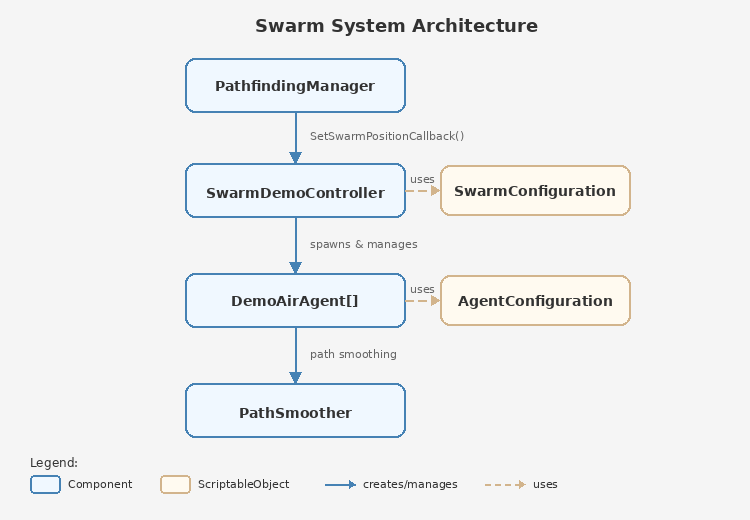
The key integration point is SetSwarmPositionCallback() — this allows PathfindingManager to query the swarm's average position for pathfinding calculations without tight coupling.
Quick Setup
Step 1: Create Configuration Assets
SwarmConfiguration:
Right-click in Project → Create → Pathfinding → Configurations → Swarm Configuration
| Setting | Default | Description |
|---|---|---|
| Number Of Agents | 5 | How many agents to spawn |
| Spawn Radius | 5 | Radius around spawn point |
| Agent Height Offset | 10 | Height above terrain |
| Path Follow Radius | 3 | How closely agents follow the path |
| Height Variation | 2 | Vertical spread between agents |
| Stagger Delay | 0.5 | Max delay between agent starts |
| Maintain Formation | true | Keep relative positions |
DemoAirAgentConfiguration:
Right-click in Project → Create → Pathfinding → Configurations → Bird Agent Configuration
| Setting | Default | Description |
|---|---|---|
| Bird Prefab | — | Prefab with DemoAirAgent component |
| Auto Spawn On First Path | true | Spawn agents when first path arrives |
| Move Speed | 10 | Agent movement speed |
| Rotation Speed | 5 | How fast agents turn |
| Enable Path Smoothing | true | Smooth corners with Bezier curves |
Step 2: Create Agent Prefab
- Create a GameObject with your visual (mesh, particle system, etc.)
- Add the
DemoAirAgentcomponent - Save as prefab
- Assign to DemoAirAgentConfiguration's Bird Prefab field
Step 3: Add SwarmDemoController
- Create empty GameObject named "SwarmController"
- Add
SwarmDemoControllercomponent - Assign both configuration assets
Step 4: Connect to PathfindingManager
The SwarmDemoController automatically registers with PathfindingManager on Start:
// This happens automatically in SwarmDemoController.Start()
_pathfindingManager.SetSwarmPositionCallback(GetAverageBirdPositionCallback);
When using TargetFollow mode, PathfindingManager calls this callback to get the swarm's current position as the path start point.
SwarmConfiguration Reference
[CreateAssetMenu(menuName = "Pathfinding/Configurations/Swarm Configuration")]
public class SwarmConfiguration : ConfigurationBase
Swarm Settings
| Property | Type | Range | Description |
|---|---|---|---|
| NumberOfAgents | int | 1-50 | Total agents in swarm |
| SpawnRadius | float | 0-20 | Circular spawn area radius |
| AgentHeightOffset | float | 0-50 | Base height above spawn point |
Swarm Behavior
| Property | Type | Range | Description |
|---|---|---|---|
| PathFollowRadius | float | 0-10 | How far agents can deviate from path |
| HeightVariation | float | 0-10 | Random height offset per agent |
| StaggerDelay | float | 0-2 | Maximum start delay for natural movement |
| MaintainFormation | bool | — | Keep relative positions during flight |
Movement Settings
| Property | Type | Range | Description |
|---|---|---|---|
| DefaultMoveSpeed | float | 1-50 | Base movement speed |
| DefaultRotationSpeed | float | 1-20 | Base rotation speed |
| ReachThreshold | float | 0.5-5 | Distance to consider waypoint reached |
DemoAirAgent Reference
The DemoAirAgent component handles individual agent movement with path smoothing.
Inspector Settings
Movement:
| Setting | Default | Description |
|---|---|---|
| Move Speed | 10 | Units per second |
| Rotation Speed | 5 | Rotation interpolation speed |
| Reach Threshold | 2 | Distance to trigger next waypoint |
Path Smoothing:
| Setting | Default | Description |
|---|---|---|
| Enable Path Smoothing | true | Use Bezier curves at corners |
| Corner Angle Threshold | 45° | Minimum angle to trigger smoothing |
| Min Turn Radius | 3 | Tightest turn radius |
| Max Turn Radius | 10 | Widest turn radius |
| Terrain Clearance | 2 | Minimum height above terrain |
| Preferred Clearance | 5 | Ideal height above terrain |
Turn Rate Limiting:
| Setting | Default | Description |
|---|---|---|
| Enable Turn Rate Limit | true | Prevent unrealistic instant turns |
Key Methods
// Initialize swarm behavior with offsets
void InitializeSwarmBehavior(float offsetRadius, float heightVariation)

// Assign a path to follow
void SetPath(List<Vector3> worldPath, bool teleportToStart = true)

// Control movement
void StopMovement()
void PauseMovement()
void ResumeMovement()

// Current position (read-only)
Vector3 CurrentPosition { get; }
SwarmDemoController Reference
The controller manages the swarm lifecycle and coordinates with PathfindingManager.
Inspector Settings
| Setting | Description |
|---|---|
| Swarm Config | Reference to SwarmConfiguration asset |
| Demo Air Agent Config | Reference to DemoAirAgentConfiguration asset |
Properties
// Current average position of all agents
Vector3 AverageBirdPosition { get; }

// Whether configurations are valid
bool IsConfigured { get; }

// Number of active agents
int BirdCount { get; }
Methods
// Destroy all agents and reset state
void ResetSwarm()
Automatic Behavior
- On Start: Validates configuration, registers callback with PathfindingManager
- On PathCalculatedEvent: Spawns agents (if first path) and assigns path to all agents
- On Update: Calculates average position, publishes SwarmUpdateEvent every 30 frames
Events
SwarmUpdateEvent
Published by SwarmDemoController at key moments:
this.Subscribe<SwarmUpdateEvent>(evt =>
{
    switch (evt.Type)
    {
        case SwarmUpdateEvent.UpdateType.BirdsSpawned:
            Debug.Log($"Spawned {evt.AgentCount} agents at {evt.Position}");
            break;

        case SwarmUpdateEvent.UpdateType.BirdsStartedPath:
            Debug.Log($"Agents started following path with {evt.Path.Count} waypoints");
            break;

        case SwarmUpdateEvent.UpdateType.SwarmPositionUpdated:
            Debug.Log($"Swarm center: {evt.Position}");
            break;
    }
});
Update Types:
| Type | When Published |
|---|---|
| BirdsSpawned | After agents are instantiated |
| BirdsStartedPath | When path is assigned to agents |
| BirdReachedTarget | When an agent completes its path |
| AllBirdsReachedTarget | When all agents complete paths |
| SwarmPositionUpdated | Every 30 frames with current position |
Path Smoothing
DemoAirAgent includes sophisticated path smoothing for natural flight paths.
How It Works
- Raw path from A* has sharp corners
- PathSmoother detects corners above threshold angle
- Bezier curves replace sharp turns
- Speed modifiers slow agents through turns
Configuration
var smoothingConfig = new PathSmoother.SmoothingConfig {
    CornerAngleThreshold = 45f,   // Degrees
    MinTurnRadius = 3f,
    MaxTurnRadius = 10f,
    BezierSegments = 5,           // Curve resolution
    TerrainClearance = 2f,
    PreferredClearance = 5f,
    TurnSpeedMultiplier = 0.7f    // Slow down in turns
};
Bird Variation
Each agent gets random variation for natural flocking:
var variation = new PathSmoother.BirdVariation {
    speedMultiplier = Random.Range(0.9f, 1.1f),
    turnRadiusMultiplier = Random.Range(0.8f, 1.2f),
    heightPreference = Random.Range(-2f, 2f),
    reactionDelay = Random.Range(0f, 0.3f)
};
Creating Custom Agents
You can create your own agent types based on DemoAirAgent.
Minimal Custom Agent
using System.Collections.Generic;
using UnityEngine;

public class SimpleAgent : MonoBehaviour
{
    [SerializeField] private float moveSpeed = 10f;
    [SerializeField] private float reachThreshold = 2f;

    private List<Vector3> _path;
    private int _currentIndex;
    private bool _isMoving;

    public Vector3 CurrentPosition => transform.position;

    public void SetPath(List<Vector3> path, bool teleportToStart = true)
    {
        _path = new List<Vector3>(path);
        _currentIndex = 0;
        _isMoving = true;

        if (teleportToStart && _path.Count > 0)
        {
            transform.position = _path[0];
        }
    }

    private void Update()
    {
        if (!_isMoving || _path == null || _currentIndex >= _path.Count)
            return;

        var target = _path[_currentIndex];

        // Move toward target
        transform.position = Vector3.MoveTowards(
            transform.position,
            target,
            moveSpeed * Time.deltaTime
        );

        // Rotate toward target
        var direction = (target - transform.position).normalized;
        if (direction != Vector3.zero)
        {
            transform.rotation = Quaternion.Slerp(
                transform.rotation,
                Quaternion.LookRotation(direction),
                5f * Time.deltaTime
            );
        }

        // Check if reached waypoint
        if (Vector3.Distance(transform.position, target) < reachThreshold)
        {
            _currentIndex++;

            if (_currentIndex >= _path.Count)
            {
                _isMoving = false;
                Debug.Log($"{name} completed path");
            }
        }
    }
}
Custom Swarm Controller
public class CustomSwarmController : MonoBehaviour
{
    [SerializeField] private GameObject agentPrefab;
    [SerializeField] private int agentCount = 10;
    [SerializeField] private float spawnRadius = 5f;

    private List<SimpleAgent> _agents = new();
    private PathfindingManager _pathfindingManager;

    private void Start()
    {
        _pathfindingManager = FindFirstObjectByType<PathfindingManager>();
        _pathfindingManager?.SetSwarmPositionCallback(GetAveragePosition);

        this.Subscribe<PathCalculatedEvent>(OnPathCalculated);
    }

    private Vector3 GetAveragePosition()
    {
        if (_agents.Count == 0) return transform.position;

        var sum = Vector3.zero;
        foreach (var agent in _agents)
        {
            sum += agent.CurrentPosition;
        }
        return sum / _agents.Count;
    }

    private void OnPathCalculated(PathCalculatedEvent evt)
    {
        if (!evt.Success) return;

        // Spawn agents if needed
        if (_agents.Count == 0)
        {
            SpawnAgents();
        }

        // Assign path to all agents
        foreach (var agent in _agents)
        {
            agent.SetPath(evt.WorldPath);
        }
    }

    private void SpawnAgents()
    {
        for (int i = 0; i < agentCount; i++)
        {
            var offset = Random.insideUnitSphere * spawnRadius;
            offset.y = Mathf.Abs(offset.y); // Keep above ground

            var go = Instantiate(agentPrefab, transform.position + offset, Quaternion.identity);
            var agent = go.GetComponent<SimpleAgent>();

            if (agent != null)
            {
                _agents.Add(agent);
            }
        }
    }
}
Best Practices
Performance
- Keep agent count reasonable (under 50 for most cases)
- Use object pooling for frequently spawned/destroyed agents
- Disable path smoothing if not needed
- Increase stagger delay to spread out path assignments
Visual Quality
- Enable path smoothing for natural flight paths
- Use height variation for depth in the swarm
- Add slight speed variation for organic movement
- Consider adding bobbing/banking animations
Integration
- Always register swarm callback before paths are calculated
- Handle agent destruction gracefully (null checks)
- Use events for loose coupling between systems
- Reset swarm state on scene transitions
See Also
- Pathfinding Manager — SetSwarmPositionCallback
- Events — SwarmUpdateEvent details
- Pathfinding Modes — TargetFollow mode for swarm tracking