Grid System
AirPath uses a 2D grid projected over your terrain to represent navigable space. This page explains how the grid works and how to configure it.
What is the Grid?
The pathfinding grid is a 2D array of cells overlaid on your 3D terrain. Each cell stores:
- Height — Terrain elevation at that cell (sampled from your height provider)
- Walkability — Whether the cell can be traversed (all cells are walkable by default)
- Pathfinding state — Temporary data used during A* calculation
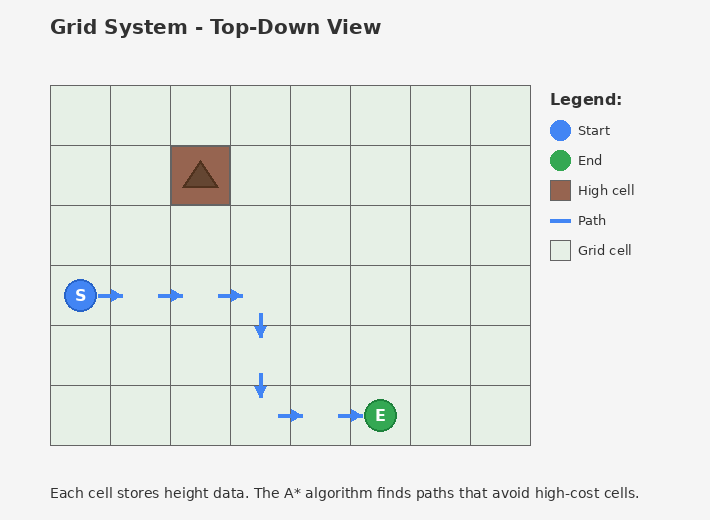
The A* algorithm finds paths through this grid, preferring cells with lower height costs.
Coordinate System
AirPath uses two coordinate systems:
World Space (Unity)
Standard Unity coordinates — X, Y (up), Z.
Grid Space
2D integer coordinates — X and Y (note: grid Y = world Z).
World Space:              Grid Space:

    Y (height)              (0,0)───────► X (GridWidth)
    │                         │
    │                         │  Each cell is one
    │                         │  grid unit
    └────────► X              │
   /                          ▼
  Z                         Y (GridHeight)
Origin
Mapping:
- Grid X → World X
- Grid Y → World Z
- World Y → Stored as height value in the cell
Conversion Example
Terrain: 1000 x 1000 units
Grid: 64 x 64 cells
Cell Size: 1000 / 64 = 15.625 units

World position (150, 25, 200):
  Grid X = Floor(150 / 15.625) = 9
  Grid Y = Floor(200 / 15.625) = 12
  Height = 25 (stored in cell)

Result: Grid position (9, 12)
Cell Size and Resolution
The grid resolution is controlled by Samples Per Dimension in PathfindingConfiguration.
Cell Size = Terrain Size / Samples Per Dimension
| Terrain Size | Samples | Cell Size | Total Cells |
|---|---|---|---|
| 1000 | 32 | 31.25 | 1,024 |
| 1000 | 64 | 15.625 | 4,096 |
| 1000 | 128 | 7.8125 | 16,384 |
| 1000 | 256 | 3.906 | 65,536 |
Trade-offs
Higher resolution (more cells):
- ✅ More accurate paths
- ✅ Better navigation around small obstacles
- ❌ More memory usage
- ❌ Longer pathfinding time
Lower resolution (fewer cells):
- ✅ Faster pathfinding
- ✅ Less memory
- ❌ Paths may cut corners
- ❌ Small terrain features ignored
Recommendation: Start with 64×64. Increase if paths look jagged, decrease if pathfinding is slow.
Height Sampling
When the grid initializes, it samples heights from your IHeightProvider.
How Sampling Works
- Grid divides terrain into cells
- For each cell, samples the underlying terrain
- Takes the maximum height within the cell area
- Stores this height for pathfinding cost calculation
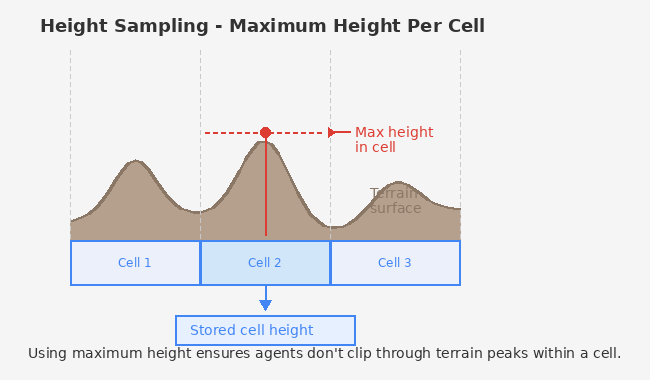
Using maximum height ensures agents don't clip through terrain peaks within a cell.
When Heights are Sampled
- Once during
PathfindingService.Initialize() - Cached for all subsequent pathfinding requests
- Call
TerrainHeightProvider.InvalidateCache()if terrain changes at runtime
Grid Origin
The grid origin (cell 0,0) aligns with the terrain's transform position.
// From TerrainHeightProvider
public Vector3 Origin => terrain.transform.position;
If your terrain is at (100, 0, 50), grid cell (0, 0) maps to world position (100, 0, 50).
Memory Layout
Internally, the grid uses flat arrays indexed by y * width + x:
Grid:           Array index:
┌───┬───┬───┐
│ 0 │ 1 │ 2 │   Row 0: indices 0, 1, 2
├───┼───┼───┤
│ 3 │ 4 │ 5 │   Row 1: indices 3, 4, 5
├───┼───┼───┤
│ 6 │ 7 │ 8 │   Row 2: indices 6, 7, 8
└───┴───┴───┘

index = y * width + x
position = (index % width, index / width)
This layout is optimized for cache-friendly access in Burst jobs.
Boundary Handling
Positions outside the grid can be handled two ways:
Auto-clamp (default): Out-of-bounds positions are clamped to the nearest valid cell. A BoundaryViolationEvent is published.
Strict: Out-of-bounds positions return errors. Useful for debugging.
Configure in PathfindingConfiguration:
- Auto Clamp Out Of Bounds — Enable/disable clamping
- Show Clamp Warnings — Log when clamping occurs
See Also
- Grid Utilities — API for coordinate conversion
- Performance Tuning — Optimizing grid resolution